> ## Documentation Index
> Fetch the complete documentation index at: https://docs.revilico.bio/llms.txt
> Use this file to discover all available pages before exploring further.
# RevpKa
> Microscopic pKa: the acidity or basicity of every ionizable site in a molecule, with per-site uncertainty
## Why Use This Engine?
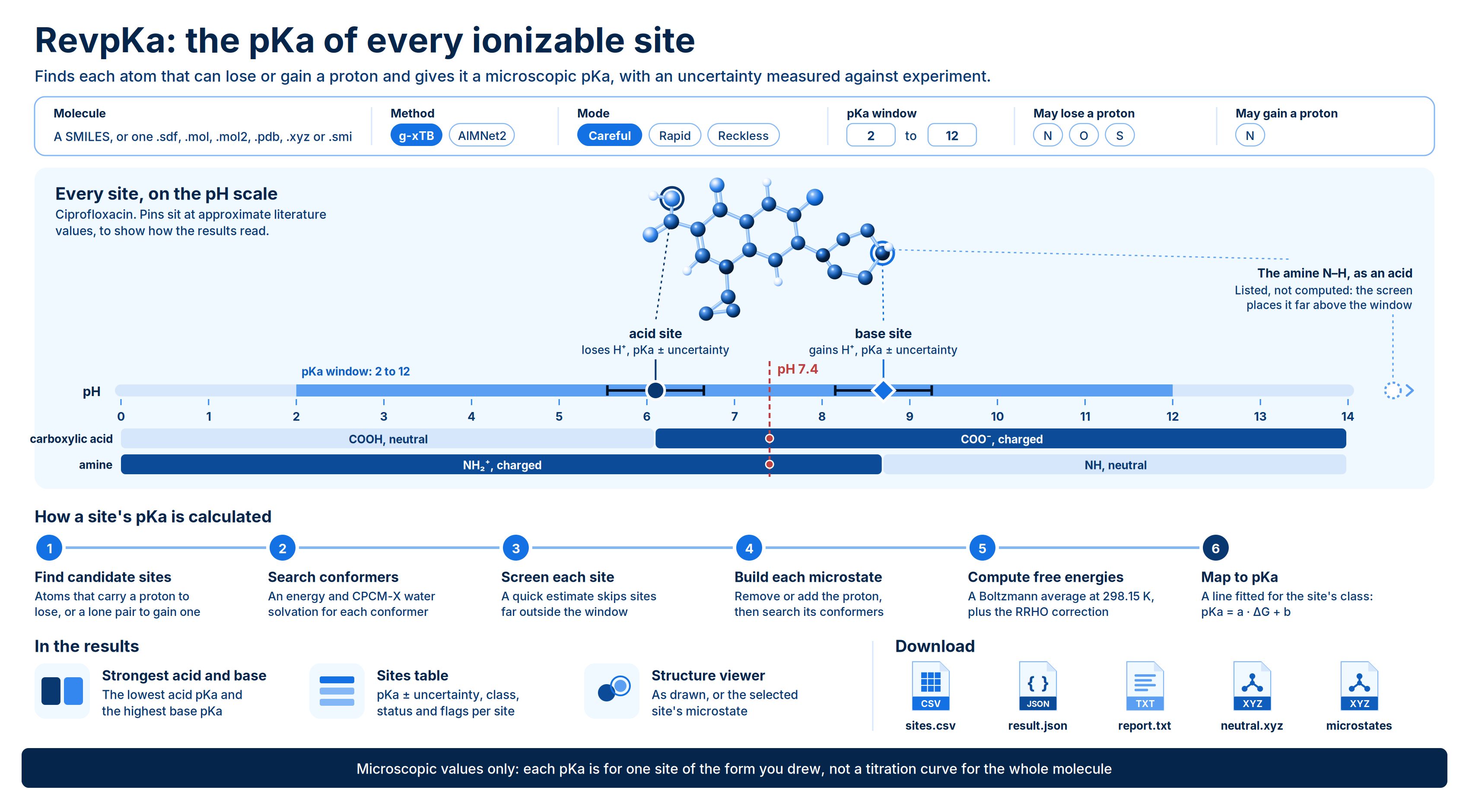
RevpKa predicts the **microscopic pKa** of each site in one molecule. It finds every atom that can lose a proton (an **acid site**) or gain one (a **base site**) and gives you a pKa for each, with an uncertainty measured against experiment for that kind of site. Each value comes from a physics calculation: conformer search, g-xTB or AIMNet2 energies, CPCM-X water solvation and thermal corrections. A correction line fitted on measured aqueous pKa then turns that result into a pKa.
Use RevpKa when you need to know which atoms in a molecule ionize, and how easily. Typical uses:
* **Find the ionizable centres.** See which nitrogens, oxygens and sulfurs protonate or deprotonate between pH 2 and 12, and which do not.
* **Predict the charge state at physiological pH.** The strongest acid and strongest base values tell you which groups carry a charge near pH 7.4.
* **Compare analogs.** See how a substituent shifts the basicity of an amine or the acidity of a phenol across a series.
* **Check a protonation state before other calculations.** Confirm the form you draw for docking, MD or quantum chemistry is the one that dominates in water.
Each run computes one molecule, from a SMILES or a structure file.
 ## Background
### Microscopic and macroscopic pKa
For a single site, the acid dissociation equilibrium is
$$
\mathrm{HA} \rightleftharpoons \mathrm{A^-} + \mathrm{H^+}, \qquad \mathrm{p}K_a = -\log_{10} K_a
$$
A **microscopic pKa** describes one site in one specific protonation state and tautomer: it is the pKa of that atom losing or gaining a proton while the rest of the molecule stays as drawn. A **macroscopic pKa** is what a titration measures. It describes the molecule as a whole, and when several sites can lose a proton from the same state, the macroscopic constant sums the microscopic ones:
$$
K_{a}^{\text{macro}} = \sum_i k_{a,i}
$$
RevpKa reports microscopic values only. It computes the protonation state and tautomer you draw, and does not combine sites or tautomers into a titration curve. For a molecule with a single ionizable site in range, the microscopic and macroscopic values coincide.
### How a site's pKa is calculated
1. **Find candidate sites.** An atom of an element you allow to lose a proton, and that carries one, is an acid site. An atom of an element you allow to gain a proton, and that has a free lone pair, is a base site. Aromatic nitrogens whose lone pair is part of the ring's π system (as in pyrrole) are not protonated. Symmetry-equivalent atoms, such as the two oxygens of a carboxylate, are computed once and reported together.
2. **Search conformers.** The molecule as drawn is embedded in 3D, its conformers are optimized, and each one's energy $E$ and CPCM-X water solvation free energy $G_{\text{solv}}$ are computed.
3. **Screen each site.** A quick estimate from a single conformer decides whether a site is worth the full calculation. Sites whose estimate falls outside the pKa window plus a buffer are listed as not computed, with the estimate.
4. **Build each microstate.** For every remaining site, the engine removes or adds the proton and searches conformers of that microstate.
5. **Compute free energies.** The free energy of each state is a Boltzmann average over its conformers at 298.15 K, plus the thermal (RRHO) correction of the lowest conformer:
$$
G_{\text{state}} = -RT \ln \sum_j e^{-(E_j + G_{\text{solv},j})/RT} + G_{\text{RRHO}}
$$
6. **Map to pKa.** The free energy change between the deprotonated and protonated forms, $\Delta G = G(\text{base}) - G(\text{acid})$, is mapped to a pKa by a straight line fitted for that site's **class** (its functional-group type):
$$
\mathrm{p}K_a = a_{\text{class}} \, \Delta G + b_{\text{class}}
$$
The correction line absorbs the systematic errors of the energy method and the solvation model. It also means a pKa is only reported when the site's class has a fitted line. A site whose class has none still gets a $\Delta G$, but no pKa.
After every optimization, the engine checks that each conformer still has the intended protons and bonds. Conformers in which a proton moved to another atom are dropped and the site is flagged. A state that has no stable structure without solvent, such as a zwitterion drawn as `[NH3+]CC(=O)[O-]`, is optimized with its heteroatom–hydrogen bonds held in place and flagged as lower confidence.
## Validation
Both methods are calibrated separately against experimental aqueous pKa values. The data are the monoprotic test sets of Baltruschat and Czodrowski (2020): literature values and in-house measurements contributed by Novartis, CC BY 4.0, each with one experimental pKa between 2 and 12. Accuracy is reported as 5-fold cross-validated error, so every prediction is scored on molecules left out of the fit.
| Method | Molecules | Size range | Cross-validated MAE | Cross-validated RMSE |
| - | - | - | - | - |
| g-xTB | 394 | 8 to 92 atoms | 0.79 pKa units | 1.05 pKa units |
| AIMNet2 | 225 | Up to 45 atoms | 0.83 pKa units | 1.10 pKa units |
Accuracy differs by site class. The **±** shown next to each pKa is its class's cross-validated RMSE:
| Class | g-xTB records | g-xTB ± | AIMNet2 records | AIMNet2 ± |
| - | - | - | - | - |
| `O:carboxylic` | 60 | 0.7 | 39 | 0.7 |
| `O:hydroxamic` | 6 | 0.7 | No line | |
| `O:phenol` | 13 | 1.2 | 10 | 1.2 |
| `N:aliphatic_amine_1` | 19 | 0.9 | 16 | 0.9 |
| `N:aliphatic_amine_2` | 35 | 1.1 | 22 | 1.4 |
| `N:aliphatic_amine_3` | 88 | 1.3 | 32 | 1.4 |
| `N:amide` | 15 | 1.1 | 12 | 1.0 |
| `N:het_aromatic_5` | 19 | 1.4 | 15 | 1.4 |
| `N:het_aromatic_6` | 96 | 0.8 | 46 | 0.8 |
| `N:iminium` | 9 | 1.1 | 7 | Not measured |
| `N:sulfonamide` | 21 | 1.3 | 13 | 1.1 |
Sites in any other class, or in a class a method has no line for, are reported as **not calibrated for this site type**, with a free energy but no pKa. The correction lines were fitted in **Careful** mode. **Reckless** mode has never been validated against measured pKa.
## Running the Engine
Open **Quantum Chemistry** > **RevQuant** > **RevpKa**. The page has two tabs: **Calculation** to set up a run and **Analysis** to view results.
Enter a **Name** (optional, up to 200 characters). A run without a name is called `RevpKa` followed by the SMILES or file name.
Under **Molecule**, choose **SMILES** and type a SMILES, or choose **Structure file** and drop a file, click to browse, or drag one in from the **Data Engineering** panel. Accepted formats are `.sdf`, `.mol`, `.mol2`, `.pdb`, `.xyz` and `.smi`, up to 10 MB. See [Preparing your input](#preparing-your-input).
Leave **Charge** empty to take it from the structure's formal charges. If you set it, it must agree with them.
Select a **Method** and a **Mode**. If your molecule contains an element a method does not cover, that method is greyed out with the reason.
Set the **pKa window** and the elements under **Elements that may lose a proton** and **Elements that may gain a proton**. To compute only specific atoms, or to change the screening buffer, open **Specific atoms and buffer**.
Enter a **Runtime Limit (Credits)** to cap what the run can spend, or leave it blank for no cap.
Click **Run pKa calculation**, then **Confirm**. A notification shows the number of candidate sites and the estimated run time, and the page switches to the **Analysis** tab with your run selected.
### Inputs
| Setting | Default | Options and notes |
| - | - | - |
| Name | Optional | Up to 200 characters |
| Molecule | Required | A SMILES (up to 2,000 characters) or one structure file: `.sdf`, `.mol`, `.mol2`, `.pdb`, `.xyz` or `.smi`, up to 10 MB. One molecule only |
| Charge | From the structure | A whole number from -10 to 10. Must match the structure's formal charges |
| Method | g-xTB | **g-xTB** or **AIMNet2**. See [Choosing a method](#choosing-a-method) |
| Mode | Careful | **Careful**, **Rapid** or **Reckless**. See [Modes](#modes) |
| pKa window | 2 to 12 | Low and high ends; the low end must be below the high end. Sites the screen places far outside it are listed but not computed |
| Elements that may lose a proton | N, O, S | Element symbols, separated by commas |
| Elements that may gain a proton | N | Element symbols, separated by commas |
| Only these atoms lose a proton | All candidates | 1-based atom numbers in your input's order. When set, only these atoms are considered as acid sites |
| Only these atoms gain a proton | All candidates | 1-based atom numbers. When set, only these atoms are considered as base sites |
| Buffer (pKa units) | The mode's default | How far outside the window a screened site may fall and still be computed. 0 or more |
| Runtime Limit (Credits) | No limit | Optional. See [Run time and credits](#run-time-and-credits) |
By default only nitrogen is considered for protonation. To include oxygen sites as bases, add `O` to **Elements that may gain a proton**.
### Preparing your input
**Draw the protonation state you mean.** The state you submit is the one computed, and every site's pKa refers to it. Draw a zwitterion as a zwitterion. If the molecule has other tautomers, the results carry a warning, because a pKa can shift by more than a unit in another tautomer.
**One molecule per run.** A SMILES with a `.` (a salt, or more than one component), an SDF with more than one record, or a `.smi` file with more than one SMILES is refused. Remove counterions before you submit.
**Atom numbering.** Sites are reported by element and 1-based atom number, such as `N8`. The numbers follow your input:
| Input | Atom numbering |
| - | - |
| SMILES or `.smi` | Heavy atoms in the order written, then hydrogens |
| `.sdf`, `.mol` | The file's own order, with any added hydrogens last |
| `.mol2`, `.pdb` | The file's own order |
| `.xyz` | The file's own order |
Use the same numbering for **Only these atoms lose a proton** and **Only these atoms gain a proton**.
**File formats.** SDF and MOL are the safest structure files, because they carry bonds and formal charges, and a pKa site is a statement about bonding. For PDB files, bond orders are guessed. XYZ files work when bonding can be read from the geometry.
### Choosing a method
| Method | Elements | Relative cost | Notes |
| - | - | - | - |
| g-xTB (default) | Any element up to radon | 1× | Converged on all 394 calibration molecules |
| AIMNet2 | H, B, C, N, O, F, Si, P, S, Cl, As, Se, Br, I | About 4× | A neural network potential. Fails to converge on about 3% of molecules |
Both methods are calibrated, and their accuracy is close (see [Validation](#validation)). The same molecule can differ by a pKa unit between the two methods, so compare values only within one method. The runs list shows which method produced each run.
### Modes
The mode sets how many conformers are searched for each protonation state and the default screening buffer.
| Mode | Conformers per state | Default buffer | Run time vs Careful | Use for |
| - | - | - | - | - |
| Careful | Up to 10 | 10 | Baseline | Final numbers. The depth the correction lines were fitted at |
| Rapid | Up to 3 | 5 | 0.43–0.66× | Faster runs on flexible molecules |
| Reckless | 1 | 5 | 0.25–0.37× | Quick looks only. Never validated against measured pKa |
### Run time and credits
Run time grows with molecule size, roughly as the number of atoms to the power 2.75 for each protonation state, and with the number of candidate sites. Measured times with g-xTB in **Careful** mode:
| Molecule | Atoms | Sites | Time |
| - | - | - | - |
| Acetic acid | 8 | 1 | 1 second |
| Histamine | 17 | 3 | 28 seconds |
| Nicotine | 26 | 2 | 37 seconds |
| Diazepam | 33 | 2 | 35 seconds |
| Imipramine | 45 | 2 | 3.3 minutes |
| Imatinib | 68 | 9 | 28 minutes |
When you submit, the run time is estimated from the molecule's size and its candidate sites. A job predicted to run longer than 8 hours is refused, and the message tells you what to change: a faster mode, the g-xTB method if you chose AIMNet2, or naming only the sites you care about under **Specific atoms and buffer**.
RevpKa bills 1 credit per minute of runtime while the run is in progress. Leave **Runtime Limit (Credits)** blank for no cap, or set it to stop the run when it reaches that many credits; the run then ends with status `terminated_budget_exceeded`. You need enough credits to start: at least the limit you set, or 10 credits when you leave it blank.
## Viewing Results
Open the **Analysis** tab and click a run in the list. Each row shows the run's status and the method it used. While a run is in progress, the results area shows its percentage complete and refreshes every 10 seconds. Click **Change Pipeline** to pick a different run.
### Run statuses
| Status | Meaning |
| - | - |
| `not_started` | Submitted and waiting for compute |
| `started` | Running |
| `processed` | Finished. Check the results for a **Failed** badge or a **Some of these values need care** notice |
| `error` | The run failed and produced no pKa values. The error message is shown in place of the results |
| `terminated_insufficient_credits` | Stopped because your credit balance ran out |
| `terminated_budget_exceeded` | Stopped because the run reached its **Runtime Limit (Credits)** |
A `processed` run also has a scientific outcome:
* **Completed.** Every computed site has a pKa from a calibrated correction line. No badge is shown.
* **Questionable.** The numbers are real, but something qualifies them: a site type with no correction line, conformers dropped because a proton moved, a protonation state held in place, or a site that could not be computed. An amber **Some of these values need care** notice appears above the sites table, and the affected sites carry flags. No badge is shown.
* **Failed.** No usable result. A red **Failed** badge and the error are shown.
AIMNet2 does not converge on every molecule. If an AIMNet2 run produces no pKa values, run the same molecule with g-xTB.
### Results
The header shows the method and mode, the pKa window and the total run time. Click **About this method** for a description of the calculation and the provenance of the energies, solvation model, thermal corrections and correction table, including the dataset attribution.
**Strongest acid and strongest base.** Two cards show the lowest pKa among the acid sites and the highest pKa among the base sites. A card reads **none computed** when no site of that kind has a pKa.
**Sites table.** One row per candidate site, including those that were not computed. Any warnings about the whole molecule, such as other tautomers or a zwitterion optimized with its protons held, are listed above the table. Click a row to mark that site on the structure.
| Column | Shows |
| - | - |
| Atom | The site, such as `N8`. Symmetry-equivalent atoms reported with it follow as `≡ 9, 10` |
| Site | **acid (loses H⁺)** or **base (gains H⁺)** |
| pKa | The pKa ± its class's uncertainty, in pKa units. When there is no pKa, the reason: **not calibrated for this site type**, **could not be computed**, or a dash for a site that was not computed |
| Class | The site's functional-group class, such as `N:het_aromatic_6` |
| Status | `computed`, `uncalibrated`, `failed` or `not computed`, with the number of conformers or the reason |
| Flags | Anything that qualifies the value (see below) |
| Flag | Meaning |
| - | - |
| **Outside the requested pKa range** | The pKa was computed but lies outside your window. The value is still shown |
| **Not calibrated for this site type** | The site's class has no correction line, so only a free energy is available |
| **Some conformations were unstable and were excluded** | A proton moved to another atom in some conformers, which were dropped |
| **This protonation state is unstable without solvent; lower confidence** | The state was optimized with its heteroatom–hydrogen bonds held in place |
| **Could not be computed** | No conformer of the microstate stayed intact |
| Info icon: only one conformation found | Only one conformer was found for a flexible site |
**Structure viewer.** A 3D view of the molecule with the selected site marked: acid sites in orange, base sites in purple, with symmetry-equivalent atoms shaded. **As drawn** shows your input molecule. The second button, such as **N8 protonated** or **O4 deprotonated**, shows that site's microstate; for a base site, the added proton is the small purple atom. The viewer shows the lowest-free-energy conformer of each ensemble.
### Downloads
Click **Download** in the results header. Each file opens in a new browser tab. File names start with the run name, with spaces and special characters replaced by `_`:
* **`{name}-sites.csv`:** one row per candidate site, computed or not, with the columns `atom_index`, `element`, `kind` (`acid` or `base`), `status` (`computed`, `uncalibrated`, `failed` or `not computed`), `pka`, `pka_uncertainty`, `delta_g_kcal_per_mol`, `functional_group`, `conformers`, `equivalent_atoms`, `screening_estimate_pka`, `flags` and `reason`. Empty cells mean no value; `equivalent_atoms` and `flags` are space-separated lists.
* **`{name}-result.json`:** the full result document, with the settings, status, every site and its conformers, the sites not computed, warnings and provenance.
* **`{name}-report.txt`:** a human-readable summary of the run, with warnings last.
* **`{name}-neutral.xyz`:** the conformers of your input molecule, lowest free energy first.
* **`{name}-microstates-{kind}_{site}.xyz`:** one file per computed site, such as `{name}-microstates-base_N8.xyz`, holding that microstate's conformers, lowest free energy first.
Atoms in every XYZ file keep your input's numbering. In a protonated microstate, the added proton is the last atom.
Never convert the `delta_g_kcal_per_mol` of an uncalibrated site into a pKa with another class's line. Without a correction line fitted for that site type, the number has nothing behind it.
## Limits
* One molecule per run, up to 60 heavy atoms and 10 MB per file.
* Charge from -10 to 10.
* Jobs predicted to take more than 8 hours are refused at submission.
* Water at 298.15 K only, with the CPCM-X solvation model.
* Microscopic pKa only: values refer to the protonation state and tautomer you draw. Macroscopic pKa and tautomer averaging are not computed.
* pKa values are reported only for site classes with a fitted correction line. The calibration data span pKa 2 to 12.
* AIMNet2 covers 14 elements and was calibrated on molecules of up to 45 atoms.
This documentation is built and hosted on [Mintlify](https://mintlify.com), a developer documentation platform.
## Background
### Microscopic and macroscopic pKa
For a single site, the acid dissociation equilibrium is
$$
\mathrm{HA} \rightleftharpoons \mathrm{A^-} + \mathrm{H^+}, \qquad \mathrm{p}K_a = -\log_{10} K_a
$$
A **microscopic pKa** describes one site in one specific protonation state and tautomer: it is the pKa of that atom losing or gaining a proton while the rest of the molecule stays as drawn. A **macroscopic pKa** is what a titration measures. It describes the molecule as a whole, and when several sites can lose a proton from the same state, the macroscopic constant sums the microscopic ones:
$$
K_{a}^{\text{macro}} = \sum_i k_{a,i}
$$
RevpKa reports microscopic values only. It computes the protonation state and tautomer you draw, and does not combine sites or tautomers into a titration curve. For a molecule with a single ionizable site in range, the microscopic and macroscopic values coincide.
### How a site's pKa is calculated
1. **Find candidate sites.** An atom of an element you allow to lose a proton, and that carries one, is an acid site. An atom of an element you allow to gain a proton, and that has a free lone pair, is a base site. Aromatic nitrogens whose lone pair is part of the ring's π system (as in pyrrole) are not protonated. Symmetry-equivalent atoms, such as the two oxygens of a carboxylate, are computed once and reported together.
2. **Search conformers.** The molecule as drawn is embedded in 3D, its conformers are optimized, and each one's energy $E$ and CPCM-X water solvation free energy $G_{\text{solv}}$ are computed.
3. **Screen each site.** A quick estimate from a single conformer decides whether a site is worth the full calculation. Sites whose estimate falls outside the pKa window plus a buffer are listed as not computed, with the estimate.
4. **Build each microstate.** For every remaining site, the engine removes or adds the proton and searches conformers of that microstate.
5. **Compute free energies.** The free energy of each state is a Boltzmann average over its conformers at 298.15 K, plus the thermal (RRHO) correction of the lowest conformer:
$$
G_{\text{state}} = -RT \ln \sum_j e^{-(E_j + G_{\text{solv},j})/RT} + G_{\text{RRHO}}
$$
6. **Map to pKa.** The free energy change between the deprotonated and protonated forms, $\Delta G = G(\text{base}) - G(\text{acid})$, is mapped to a pKa by a straight line fitted for that site's **class** (its functional-group type):
$$
\mathrm{p}K_a = a_{\text{class}} \, \Delta G + b_{\text{class}}
$$
The correction line absorbs the systematic errors of the energy method and the solvation model. It also means a pKa is only reported when the site's class has a fitted line. A site whose class has none still gets a $\Delta G$, but no pKa.
After every optimization, the engine checks that each conformer still has the intended protons and bonds. Conformers in which a proton moved to another atom are dropped and the site is flagged. A state that has no stable structure without solvent, such as a zwitterion drawn as `[NH3+]CC(=O)[O-]`, is optimized with its heteroatom–hydrogen bonds held in place and flagged as lower confidence.
## Validation
Both methods are calibrated separately against experimental aqueous pKa values. The data are the monoprotic test sets of Baltruschat and Czodrowski (2020): literature values and in-house measurements contributed by Novartis, CC BY 4.0, each with one experimental pKa between 2 and 12. Accuracy is reported as 5-fold cross-validated error, so every prediction is scored on molecules left out of the fit.
| Method | Molecules | Size range | Cross-validated MAE | Cross-validated RMSE |
| - | - | - | - | - |
| g-xTB | 394 | 8 to 92 atoms | 0.79 pKa units | 1.05 pKa units |
| AIMNet2 | 225 | Up to 45 atoms | 0.83 pKa units | 1.10 pKa units |
Accuracy differs by site class. The **±** shown next to each pKa is its class's cross-validated RMSE:
| Class | g-xTB records | g-xTB ± | AIMNet2 records | AIMNet2 ± |
| - | - | - | - | - |
| `O:carboxylic` | 60 | 0.7 | 39 | 0.7 |
| `O:hydroxamic` | 6 | 0.7 | No line | |
| `O:phenol` | 13 | 1.2 | 10 | 1.2 |
| `N:aliphatic_amine_1` | 19 | 0.9 | 16 | 0.9 |
| `N:aliphatic_amine_2` | 35 | 1.1 | 22 | 1.4 |
| `N:aliphatic_amine_3` | 88 | 1.3 | 32 | 1.4 |
| `N:amide` | 15 | 1.1 | 12 | 1.0 |
| `N:het_aromatic_5` | 19 | 1.4 | 15 | 1.4 |
| `N:het_aromatic_6` | 96 | 0.8 | 46 | 0.8 |
| `N:iminium` | 9 | 1.1 | 7 | Not measured |
| `N:sulfonamide` | 21 | 1.3 | 13 | 1.1 |
Sites in any other class, or in a class a method has no line for, are reported as **not calibrated for this site type**, with a free energy but no pKa. The correction lines were fitted in **Careful** mode. **Reckless** mode has never been validated against measured pKa.
## Running the Engine
Open **Quantum Chemistry** > **RevQuant** > **RevpKa**. The page has two tabs: **Calculation** to set up a run and **Analysis** to view results.
Enter a **Name** (optional, up to 200 characters). A run without a name is called `RevpKa` followed by the SMILES or file name.
Under **Molecule**, choose **SMILES** and type a SMILES, or choose **Structure file** and drop a file, click to browse, or drag one in from the **Data Engineering** panel. Accepted formats are `.sdf`, `.mol`, `.mol2`, `.pdb`, `.xyz` and `.smi`, up to 10 MB. See [Preparing your input](#preparing-your-input).
Leave **Charge** empty to take it from the structure's formal charges. If you set it, it must agree with them.
Select a **Method** and a **Mode**. If your molecule contains an element a method does not cover, that method is greyed out with the reason.
Set the **pKa window** and the elements under **Elements that may lose a proton** and **Elements that may gain a proton**. To compute only specific atoms, or to change the screening buffer, open **Specific atoms and buffer**.
Enter a **Runtime Limit (Credits)** to cap what the run can spend, or leave it blank for no cap.
Click **Run pKa calculation**, then **Confirm**. A notification shows the number of candidate sites and the estimated run time, and the page switches to the **Analysis** tab with your run selected.
### Inputs
| Setting | Default | Options and notes |
| - | - | - |
| Name | Optional | Up to 200 characters |
| Molecule | Required | A SMILES (up to 2,000 characters) or one structure file: `.sdf`, `.mol`, `.mol2`, `.pdb`, `.xyz` or `.smi`, up to 10 MB. One molecule only |
| Charge | From the structure | A whole number from -10 to 10. Must match the structure's formal charges |
| Method | g-xTB | **g-xTB** or **AIMNet2**. See [Choosing a method](#choosing-a-method) |
| Mode | Careful | **Careful**, **Rapid** or **Reckless**. See [Modes](#modes) |
| pKa window | 2 to 12 | Low and high ends; the low end must be below the high end. Sites the screen places far outside it are listed but not computed |
| Elements that may lose a proton | N, O, S | Element symbols, separated by commas |
| Elements that may gain a proton | N | Element symbols, separated by commas |
| Only these atoms lose a proton | All candidates | 1-based atom numbers in your input's order. When set, only these atoms are considered as acid sites |
| Only these atoms gain a proton | All candidates | 1-based atom numbers. When set, only these atoms are considered as base sites |
| Buffer (pKa units) | The mode's default | How far outside the window a screened site may fall and still be computed. 0 or more |
| Runtime Limit (Credits) | No limit | Optional. See [Run time and credits](#run-time-and-credits) |
By default only nitrogen is considered for protonation. To include oxygen sites as bases, add `O` to **Elements that may gain a proton**.
### Preparing your input
**Draw the protonation state you mean.** The state you submit is the one computed, and every site's pKa refers to it. Draw a zwitterion as a zwitterion. If the molecule has other tautomers, the results carry a warning, because a pKa can shift by more than a unit in another tautomer.
**One molecule per run.** A SMILES with a `.` (a salt, or more than one component), an SDF with more than one record, or a `.smi` file with more than one SMILES is refused. Remove counterions before you submit.
**Atom numbering.** Sites are reported by element and 1-based atom number, such as `N8`. The numbers follow your input:
| Input | Atom numbering |
| - | - |
| SMILES or `.smi` | Heavy atoms in the order written, then hydrogens |
| `.sdf`, `.mol` | The file's own order, with any added hydrogens last |
| `.mol2`, `.pdb` | The file's own order |
| `.xyz` | The file's own order |
Use the same numbering for **Only these atoms lose a proton** and **Only these atoms gain a proton**.
**File formats.** SDF and MOL are the safest structure files, because they carry bonds and formal charges, and a pKa site is a statement about bonding. For PDB files, bond orders are guessed. XYZ files work when bonding can be read from the geometry.
### Choosing a method
| Method | Elements | Relative cost | Notes |
| - | - | - | - |
| g-xTB (default) | Any element up to radon | 1× | Converged on all 394 calibration molecules |
| AIMNet2 | H, B, C, N, O, F, Si, P, S, Cl, As, Se, Br, I | About 4× | A neural network potential. Fails to converge on about 3% of molecules |
Both methods are calibrated, and their accuracy is close (see [Validation](#validation)). The same molecule can differ by a pKa unit between the two methods, so compare values only within one method. The runs list shows which method produced each run.
### Modes
The mode sets how many conformers are searched for each protonation state and the default screening buffer.
| Mode | Conformers per state | Default buffer | Run time vs Careful | Use for |
| - | - | - | - | - |
| Careful | Up to 10 | 10 | Baseline | Final numbers. The depth the correction lines were fitted at |
| Rapid | Up to 3 | 5 | 0.43–0.66× | Faster runs on flexible molecules |
| Reckless | 1 | 5 | 0.25–0.37× | Quick looks only. Never validated against measured pKa |
### Run time and credits
Run time grows with molecule size, roughly as the number of atoms to the power 2.75 for each protonation state, and with the number of candidate sites. Measured times with g-xTB in **Careful** mode:
| Molecule | Atoms | Sites | Time |
| - | - | - | - |
| Acetic acid | 8 | 1 | 1 second |
| Histamine | 17 | 3 | 28 seconds |
| Nicotine | 26 | 2 | 37 seconds |
| Diazepam | 33 | 2 | 35 seconds |
| Imipramine | 45 | 2 | 3.3 minutes |
| Imatinib | 68 | 9 | 28 minutes |
When you submit, the run time is estimated from the molecule's size and its candidate sites. A job predicted to run longer than 8 hours is refused, and the message tells you what to change: a faster mode, the g-xTB method if you chose AIMNet2, or naming only the sites you care about under **Specific atoms and buffer**.
RevpKa bills 1 credit per minute of runtime while the run is in progress. Leave **Runtime Limit (Credits)** blank for no cap, or set it to stop the run when it reaches that many credits; the run then ends with status `terminated_budget_exceeded`. You need enough credits to start: at least the limit you set, or 10 credits when you leave it blank.
## Viewing Results
Open the **Analysis** tab and click a run in the list. Each row shows the run's status and the method it used. While a run is in progress, the results area shows its percentage complete and refreshes every 10 seconds. Click **Change Pipeline** to pick a different run.
### Run statuses
| Status | Meaning |
| - | - |
| `not_started` | Submitted and waiting for compute |
| `started` | Running |
| `processed` | Finished. Check the results for a **Failed** badge or a **Some of these values need care** notice |
| `error` | The run failed and produced no pKa values. The error message is shown in place of the results |
| `terminated_insufficient_credits` | Stopped because your credit balance ran out |
| `terminated_budget_exceeded` | Stopped because the run reached its **Runtime Limit (Credits)** |
A `processed` run also has a scientific outcome:
* **Completed.** Every computed site has a pKa from a calibrated correction line. No badge is shown.
* **Questionable.** The numbers are real, but something qualifies them: a site type with no correction line, conformers dropped because a proton moved, a protonation state held in place, or a site that could not be computed. An amber **Some of these values need care** notice appears above the sites table, and the affected sites carry flags. No badge is shown.
* **Failed.** No usable result. A red **Failed** badge and the error are shown.
AIMNet2 does not converge on every molecule. If an AIMNet2 run produces no pKa values, run the same molecule with g-xTB.
### Results
The header shows the method and mode, the pKa window and the total run time. Click **About this method** for a description of the calculation and the provenance of the energies, solvation model, thermal corrections and correction table, including the dataset attribution.
**Strongest acid and strongest base.** Two cards show the lowest pKa among the acid sites and the highest pKa among the base sites. A card reads **none computed** when no site of that kind has a pKa.
**Sites table.** One row per candidate site, including those that were not computed. Any warnings about the whole molecule, such as other tautomers or a zwitterion optimized with its protons held, are listed above the table. Click a row to mark that site on the structure.
| Column | Shows |
| - | - |
| Atom | The site, such as `N8`. Symmetry-equivalent atoms reported with it follow as `≡ 9, 10` |
| Site | **acid (loses H⁺)** or **base (gains H⁺)** |
| pKa | The pKa ± its class's uncertainty, in pKa units. When there is no pKa, the reason: **not calibrated for this site type**, **could not be computed**, or a dash for a site that was not computed |
| Class | The site's functional-group class, such as `N:het_aromatic_6` |
| Status | `computed`, `uncalibrated`, `failed` or `not computed`, with the number of conformers or the reason |
| Flags | Anything that qualifies the value (see below) |
| Flag | Meaning |
| - | - |
| **Outside the requested pKa range** | The pKa was computed but lies outside your window. The value is still shown |
| **Not calibrated for this site type** | The site's class has no correction line, so only a free energy is available |
| **Some conformations were unstable and were excluded** | A proton moved to another atom in some conformers, which were dropped |
| **This protonation state is unstable without solvent; lower confidence** | The state was optimized with its heteroatom–hydrogen bonds held in place |
| **Could not be computed** | No conformer of the microstate stayed intact |
| Info icon: only one conformation found | Only one conformer was found for a flexible site |
**Structure viewer.** A 3D view of the molecule with the selected site marked: acid sites in orange, base sites in purple, with symmetry-equivalent atoms shaded. **As drawn** shows your input molecule. The second button, such as **N8 protonated** or **O4 deprotonated**, shows that site's microstate; for a base site, the added proton is the small purple atom. The viewer shows the lowest-free-energy conformer of each ensemble.
### Downloads
Click **Download** in the results header. Each file opens in a new browser tab. File names start with the run name, with spaces and special characters replaced by `_`:
* **`{name}-sites.csv`:** one row per candidate site, computed or not, with the columns `atom_index`, `element`, `kind` (`acid` or `base`), `status` (`computed`, `uncalibrated`, `failed` or `not computed`), `pka`, `pka_uncertainty`, `delta_g_kcal_per_mol`, `functional_group`, `conformers`, `equivalent_atoms`, `screening_estimate_pka`, `flags` and `reason`. Empty cells mean no value; `equivalent_atoms` and `flags` are space-separated lists.
* **`{name}-result.json`:** the full result document, with the settings, status, every site and its conformers, the sites not computed, warnings and provenance.
* **`{name}-report.txt`:** a human-readable summary of the run, with warnings last.
* **`{name}-neutral.xyz`:** the conformers of your input molecule, lowest free energy first.
* **`{name}-microstates-{kind}_{site}.xyz`:** one file per computed site, such as `{name}-microstates-base_N8.xyz`, holding that microstate's conformers, lowest free energy first.
Atoms in every XYZ file keep your input's numbering. In a protonated microstate, the added proton is the last atom.
Never convert the `delta_g_kcal_per_mol` of an uncalibrated site into a pKa with another class's line. Without a correction line fitted for that site type, the number has nothing behind it.
## Limits
* One molecule per run, up to 60 heavy atoms and 10 MB per file.
* Charge from -10 to 10.
* Jobs predicted to take more than 8 hours are refused at submission.
* Water at 298.15 K only, with the CPCM-X solvation model.
* Microscopic pKa only: values refer to the protonation state and tautomer you draw. Macroscopic pKa and tautomer averaging are not computed.
* pKa values are reported only for site classes with a fitted correction line. The calibration data span pKa 2 to 12.
* AIMNet2 covers 14 elements and was calibrated on molecules of up to 45 atoms.
This documentation is built and hosted on [Mintlify](https://mintlify.com), a developer documentation platform.