

Why Use This Engine?
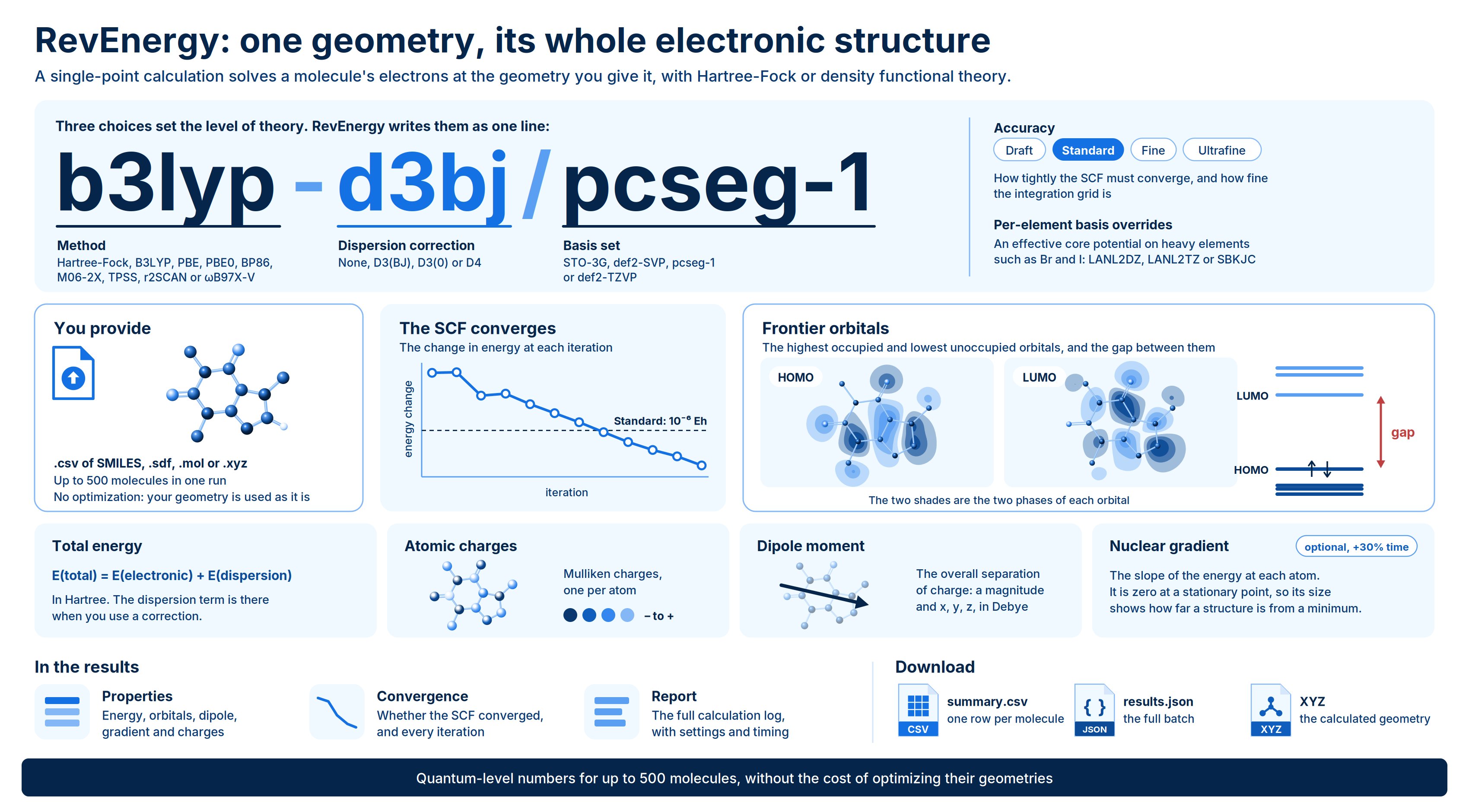
RevEnergy runs a single-point quantum chemistry calculation: it takes a molecule at a fixed geometry and solves for its electronic structure with Hartree-Fock or density functional theory (DFT). In one pass it returns the total energy, the HOMO and LUMO energies and their gap, atomic charges, the dipole moment and, if you ask for it, the nuclear gradient. Use RevEnergy when you need quantum-level numbers for a set of compounds without the cost of optimizing their geometries. Typical uses:- Rank analogs by electronic properties. Compare HOMO-LUMO gaps, dipoles and charge distributions across a series to support SAR interpretation.
- Screen reactivity and stability. A small HOMO-LUMO gap and strongly polarized atoms flag compounds that may be chemically or metabolically labile.
- Re-score geometries from other tools. Compute a DFT energy on a docked pose, a conformer or a force-field structure you already have.
- Check a geometry. A large gradient tells you a structure is far from a stationary point.
Background
A single-point calculation solves the electronic Schrödinger equation for fixed nuclear positions. RevEnergy uses the self-consistent field (SCF) approach: each electron moves in the average field of all the others, and that field is refined iteratively until it stops changing. In Kohn-Sham DFT the orbitals satisfy where is the attraction to the nuclei, is the classical electron-electron repulsion and is the exchange-correlation potential. The choice of functional determines how is approximated; Hartree-Fock replaces it with exact exchange and no correlation. Three choices set the level of theory, which RevEnergy writes in the shorthandmethod-dispersion/basis (for example b3lyp-d3bj/pcseg-1):
- Method: the functional (or Hartree-Fock) that approximates exchange and correlation.
- Basis set: the set of functions the orbitals are built from. Larger basis sets are more accurate and much slower: cost grows roughly with the fourth power of the number of basis functions.
- Dispersion correction: most functionals miss the long-range attraction between non-bonded atoms (London dispersion). An empirical correction such as D3(BJ) adds it back, which matters for stacking, folded conformations and non-covalent contacts.
- Total energy is the electronic energy plus the dispersion correction:
- Frontier orbitals. The HOMO is the highest occupied orbital and the LUMO the lowest unoccupied one. The gap is the minimum energy needed to move an electron from the most weakly held occupied state to the lowest empty state; a small gap indicates a more reactive, more polarizable molecule.
- Atomic charges use Mulliken population analysis, which divides the electron density among the atoms.
- Dipole moment measures the overall separation of charge in the molecule.
- Nuclear gradient is the derivative of the energy with respect to each atom’s position, . It is zero at a stationary point, so its size tells you how far the structure is from a minimum.
Validation
At the recommended settings (B3LYP-D3(BJ)/pcseg-1, Standard accuracy, with LANL2DZ on bromine), RevEnergy was benchmarked against an independent reference calculation on 5-bromo-2,3-dihydrooxazole:
The other accuracy presets and functionals are fully supported. Only the Standard preset with B3LYP has been benchmarked against an external reference.
Running the Engine
Open Quantum Chemistry > RevQuant > RevEnergy. The page has two tabs: Single Point to set up a run and Analysis to view results.1
Name the run
Enter a Name (optional, up to 200 characters). Runs without a name get a default one.
2
Add your structures
Drop a file on Structures, or click to browse. You can also drag a file from the Data Engineering panel. Accepted formats are
.csv, .sdf, .mol and .xyz, up to 10 MB and 500 molecules. See Preparing input files.3
Choose the level of theory
Select a Method, Basis set, Dispersion correction and Accuracy. The Level of theory strip shows the resulting shorthand, such as
b3lyp-d3bj/pcseg-1. The defaults are a sensible starting point for drug-like organic molecules.4
Adjust advanced settings (optional)
Open Advanced to choose which properties to compute, add per-element basis overrides, or set the charge and spin multiplicity for an XYZ file.
5
Run the calculation
Click Run calculation, then Confirm. A notification shows a rough runtime estimate, and the page switches to the Analysis tab with your run selected.
Inputs
Preparing input files
CSV (SMILES). The file needs asmiles column (smile, canonical_smiles or structure also work). Optional columns:
- Name:
name,id,molecule_name,compound_idortitle - Charge:
charge,formal_chargeornet_charge - Multiplicity:
multiplicity,spin_multiplicityormult
The geometry you provide is the geometry that is calculated; RevEnergy does not optimize structures. For SMILES input, results are for a force-field geometry, not a quantum-optimized one. If you need optimized structures, optimize them first and upload the result as SDF or XYZ.
Heavy elements and basis overrides
Heavy elements such as bromine and iodine are usually treated with an effective core potential (ECP), which replaces the inner-shell electrons with a potential and keeps the calculation affordable. Under Advanced > Per-element basis overrides, click Add, enter the elements (for exampleBr, I) and choose LANL2DZ, LANL2TZ or SBKJC. All other atoms keep the main basis set. The Diagnostics section of the results reports how many electrons the ECP replaced.
Accuracy presets
The accuracy preset controls how tightly the SCF must converge and how fine the integration grid for the DFT exchange-correlation energy is.Run time and credits
Molecules in a run are calculated one after another, so the total time grows with the number of molecules and, much more steeply, with their size and basis set. As a guide at pcseg-1 and Standard accuracy:
STO-3G takes seconds per molecule, and def2-TZVP takes several times longer than pcseg-1. The estimate shown after you submit is an order-of-magnitude guide that does not account for molecule size.
RevEnergy consumes credits while the calculation runs, based on actual runtime. You need enough credits to start a run, and a run stops if your credits run out.
Viewing Results
Open the Analysis tab and click a run in the list. Runs that are still in progress show their percentage complete and refresh automatically every 10 seconds.Run statuses
A run can finish as
processed with some failed molecules. The header shows how many completed and how many failed, and failed molecules are marked with a warning icon. Turn on Failures only to list them.
Results for each molecule
The run header shows the level of theory, the completed and failed counts, and the total runtime. Select a molecule from the tabs; for runs with more than eight molecules, you can filter by name, formula or SMILES. Calculated geometry. An interactive 3D view of the exact structure that was calculated. Click XYZ to download it. Badges show the formula, status, total energy and HOMO-LUMO gap. Properties tab:
Convergence tab. Shows whether the SCF converged and how many iterations it took, with the energy, energy change and commutator error at each iteration. A steadily shrinking energy change is a healthy run.
Report tab. The full plain-text calculation log, including the settings, basis set assignment and timing breakdown.
Downloads
Click Download in the run header to get two files:{name}-summary.csv: one row per molecule, with the energy (in Eh and kcal/mol), electronic and dispersion energies, HOMO, LUMO and gap, dipole magnitude, RMS gradient, SCF iterations and convergence, runtime, geometry source and any error message.{name}-results.json: the full batch document, with the run settings, counts, and each molecule’s results and warnings. Warnings, such as a SMILES that needed a fallback force field to embed, appear only in this file.
Limits
- Up to 500 molecules and 10 MB per file.
- Gas phase only; solvation models are not available.
- No geometry optimization, frequencies or thermochemistry. For those, use RevGeometry.
- Mulliken is the only atomic charge scheme. Mulliken charges depend on the basis set, so compare them only between calculations at the same level of theory.
- Spin densities are reported only for open-shell molecules (multiplicity greater than 1).