

Why Use This Engine?
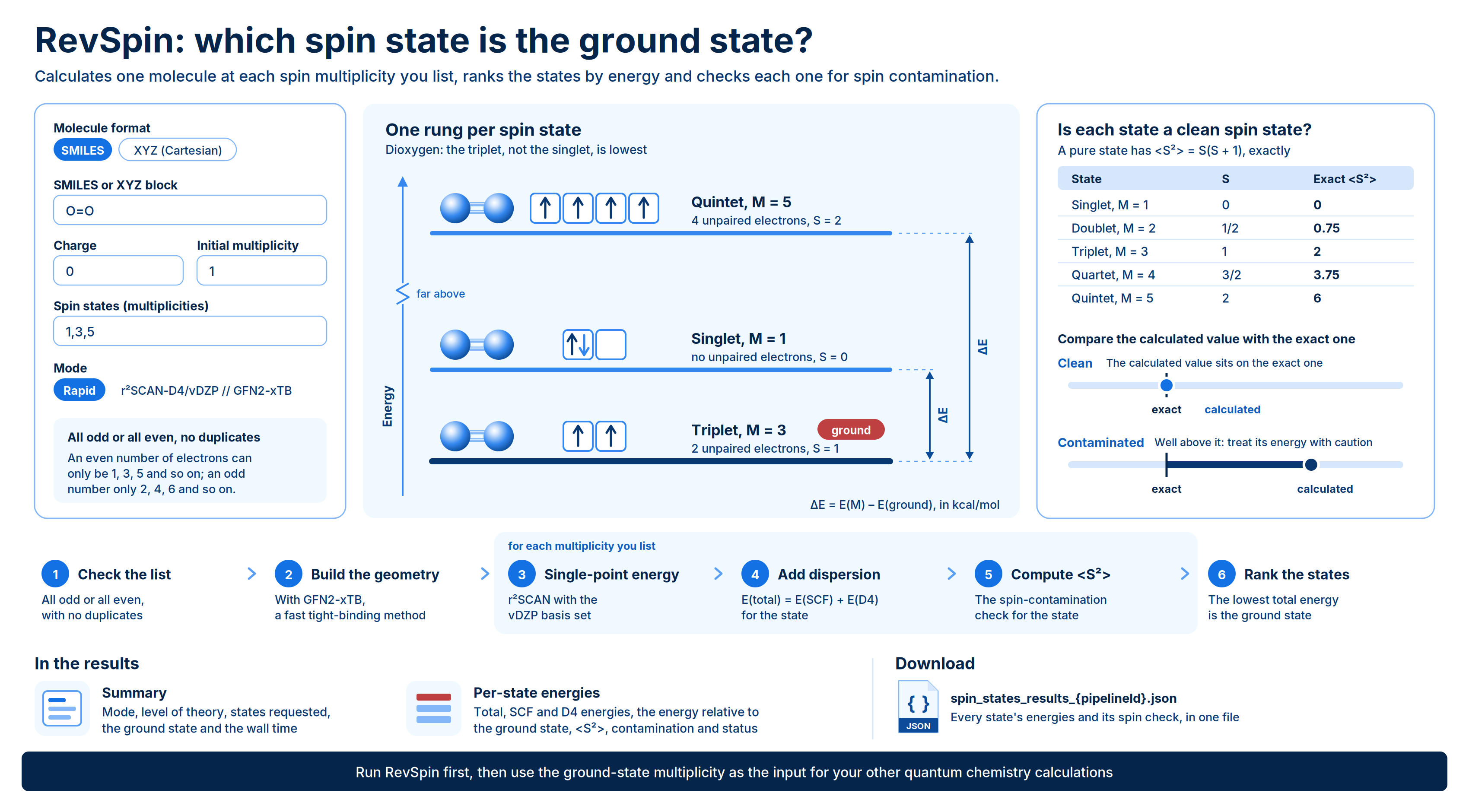
RevSpin calculates the energy of one molecule in several spin states and ranks them. You list the spin multiplicities you want to compare, such as singlet, triplet and quintet, and RevSpin returns the total energy of each state, its energy relative to the lowest state, and a spin-contamination check. The lowest-energy state is reported as the ground state. Use RevSpin when the spin state of a molecule is not obvious or matters to your result. Typical uses:- Find the ground spin state. Transition-metal complexes, carbenes, nitrenes and some radicals can have a high-spin or a low-spin ground state, and the answer is not always clear from the structure.
- Measure spin-state gaps. The relative energy tells you how far each excited spin state lies above the ground state, in kcal/mol.
- Choose the multiplicity for other calculations. Run RevSpin first, then use the ground-state multiplicity as the input for other quantum chemistry engines.
- Check open-shell results. The spin-contamination values flag states whose unrestricted wavefunction is not a clean spin state.
Background
An atom or molecule’s spin multiplicity counts how many ways its total electron spin can be oriented: Each unpaired electron contributes , so a molecule with no unpaired electrons is a singlet (), one unpaired electron gives a doublet (), two give a triplet (), and so on. A molecule with an even number of electrons can only have odd multiplicities (1, 3, 5, …). A molecule with an odd number of electrons can only have even multiplicities (2, 4, 6, …). Different spin states of the same molecule have different electronic energies, and often different preferred geometries. The spin-state energy gap between a state and the ground state is where the ground state is the multiplicity with the lowest total energy. Small gaps, of a few kcal/mol, are common in transition-metal chemistry and are sensitive to the method used. RevSpin runs in Rapid mode, writtenr²SCAN-D4/vDZP // GFN2-xTB. The part after // is the method for the geometry and the part before it is the method for the energy:
- Geometry: GFN2-xTB, a fast semi-empirical tight-binding method.
- Energy: a single-point DFT calculation with the r²SCAN meta-GGA functional and the vDZP basis set, plus the D4 dispersion correction.
Running the Engine
Open Quantum Chemistry > RevQuant > RevSpin. The page has two tabs: Spin States to set up a run and Analysis to view results.1
Name the run
Enter a Pipeline Name. It is required and defaults to “Spin-State Energies”.
2
Choose the molecule format
Under Molecule Format, select SMILES or XYZ (Cartesian). See Preparing the molecule.
3
Enter the molecule
Paste a single SMILES string into SMILES, or a full XYZ block into XYZ Block.
4
Set the charge and spin states
Enter the net Charge and the Initial Multiplicity for the reference geometry. In Spin States (Multiplicities), list the multiplicities to compare, separated by commas, for example
1,3,5.5
Set a runtime limit (optional)
Enter a Runtime Limit (Credits) to cap what the run can spend. Leave it blank for no cap. See Run time and credits.
6
Run the analysis
Click Run Analysis, then confirm. A notification links to the Command Center, where you can follow the run, and the page switches to the Analysis tab.
Inputs
Preparing the molecule
SMILES. Enter a single SMILES string, for exampleO for water or [Fe+2] for an iron(II) ion. SMILES have no 3D geometry, so the starting structure is built with RDKit 3D embedding and the MMFF force field.
XYZ. Paste a standard XYZ block: the atom count on line 1, a comment on line 2, then one line per atom with the element symbol and its x, y and z coordinates:
Charge applies to SMILES input too. Set it to the net charge of the molecule, for example
2 for [Fe+2].Run time and credits
Run time grows with the size of the molecule and the number of spin states you request. Transition-metal complexes and larger molecules can take several minutes or more. RevSpin bills 1 credit per minute of runtime while the run is in progress. You need enough credits to start a run: at least 10 credits, or your Runtime Limit (Credits) if you set one. With a runtime limit, the run stops when it reaches the limit and ends with the statusterminated_budget_exceeded. With the field blank, there is no cap.
Viewing Results
Open the Analysis tab. The table lists your completed RevSpin runs. Click a run to open its results, and click Back to pipelines to return to the list. Runs that are still in progress, failed or were stopped do not appear in this list; follow them in the Command Center.Run statuses
Summary
The Summary card shows:Per-state energies
The Per-State Energies table has one row per requested multiplicity. The ground state row is highlighted and carries a ground badge.
A value the engine did not return is shown as a dash (—).
A run can finish as
processed even if some states failed. Check the Status column, and do not use the energies of a state marked failed.
Downloads
Click Download JSON in the results view to getspin_states_results_{pipelineId}.json. It is the full results document for the run, including the mode, level of theory, the per-state energies and spin data, the ranking of states by relative energy and the ground-state multiplicity.
Limits
- One molecule per run.
- Rapid (
r²SCAN-D4/vDZP // GFN2-xTB) is the only calculation mode. - All requested multiplicities must share the same parity (all odd or all even) and must not repeat.
- Geometries come from GFN2-xTB, a semi-empirical method, not from DFT.
- The Analysis tab lists completed runs only.