

Why Use This Engine?
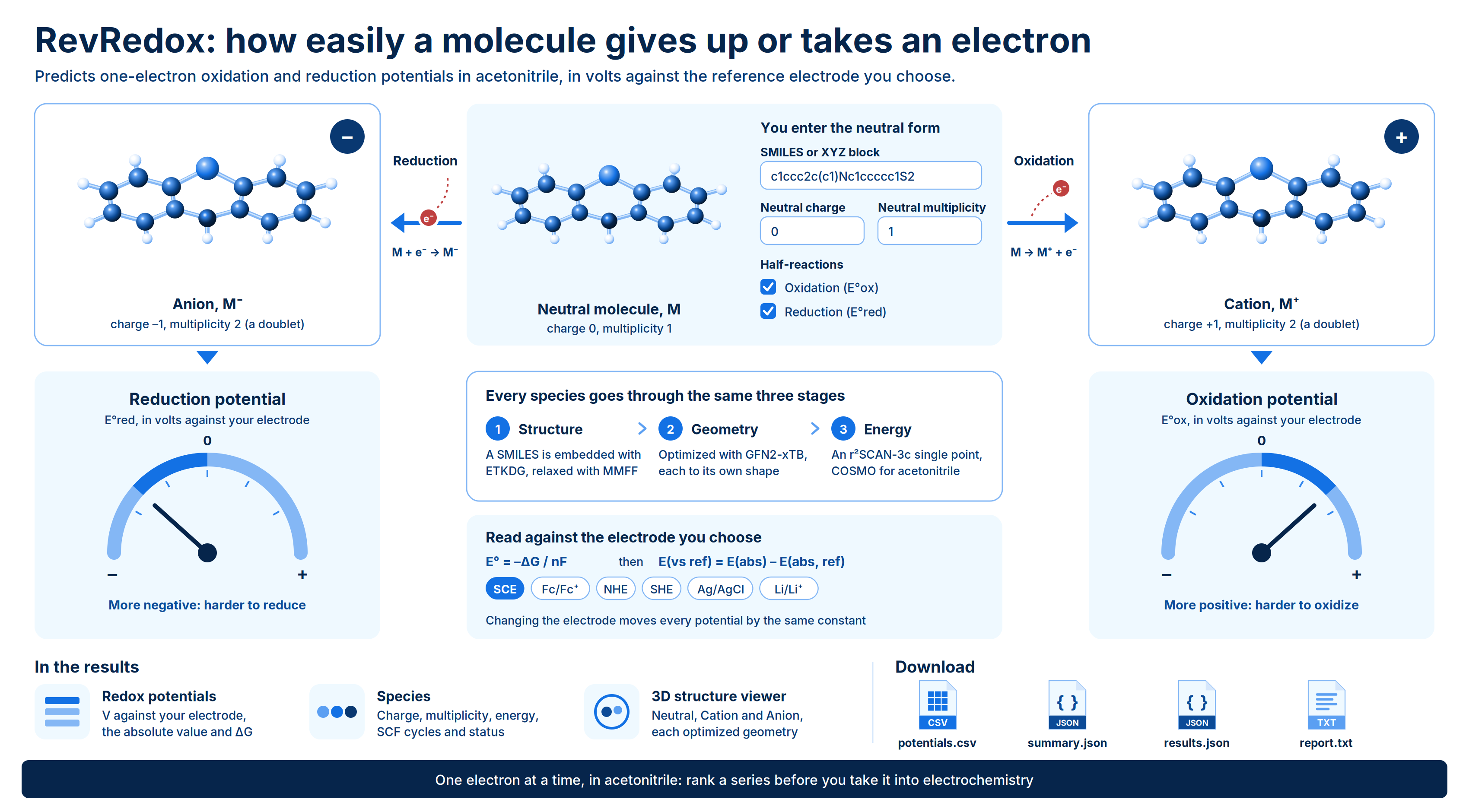
RevRedox predicts the one-electron redox potentials of a molecule. It calculates the neutral molecule together with its cation, its anion or both, and turns the free-energy difference between them into an oxidation potential (E°ox), a reduction potential (E°red) or both. Potentials are reported in volts against the reference electrode you pick, so you can compare them directly with cyclic voltammetry data. Use RevRedox when you want an estimate of how easily a compound gives up or accepts an electron. Typical uses:- Anticipate oxidative liability. A low oxidation potential flags compounds that are easily oxidized, for example by metabolic or chemical oxidants.
- Rank a series before you measure it. Compare predicted potentials across analogs to decide which compounds to take into electrochemistry.
- Design redox-active molecules. Screen candidate photocatalysts, mediators or electrolyte components for a target potential window.
- Check an experimental assignment. See whether a measured wave is consistent with oxidation or reduction of the parent molecule.
Background
A one-electron redox potential measures the free-energy change when a molecule gains or loses an electron in solution. For a reduction half-reaction the standard potential follows from the Gibbs free energy of the reaction: where is the number of electrons transferred (one here) and is the Faraday constant. The oxidation potential describes the couple , formed when the neutral molecule loses an electron: A more positive oxidation potential means the molecule is harder to oxidize. A more negative reduction potential means it is harder to reduce. The free energies computed for the species give an absolute potential, measured against a free electron in vacuum. Experimental potentials are measured against a reference electrode, so RevRedox shifts the absolute value by the absolute potential of the electrode you choose: The engine holds a tabulated absolute potential for each supported electrode. Changing the reference electrode moves every reported potential by the same constant, so relative differences between molecules do not depend on it. RevRedox computes each species (neutral, cation, anion) in three stages:- Structure. A SMILES string is embedded in 3D with RDKit (ETKDG) and relaxed with the MMFF force field. An XYZ block is used as the starting geometry.
- Geometry. Each species is optimized with the semiempirical tight-binding method GFN2-xTB, so the cation and anion relax to their own structures rather than keeping the neutral geometry.
- Energy. A single-point calculation with the composite DFT method r²SCAN-3c runs on each optimized geometry. The COSMO implicit solvation model represents acetonitrile.
r²SCAN-3c/COSMO(MeCN) // GFN2-xTB: the method before // gives the energy, and the method after it gives the geometry.
The charge and spin multiplicity of the cation and anion are derived from the neutral form. The cation has a charge one higher and the anion a charge one lower than the neutral molecule. Their multiplicities follow the lowest-multiplicity rule, so a closed-shell neutral molecule (multiplicity 1) gives a doublet cation and a doublet anion.
Running the Engine
Open Quantum Chemistry > RevQuant > RevRedox. The page has two tabs: Redox Potentials to set up a run and Analysis to view results.1
Name the run
Enter a Pipeline Name. The default is
Redox Potentials.2
Enter your molecule
Choose a Molecule Format, SMILES or XYZ (Cartesian), then paste the neutral molecule into the SMILES or XYZ Block box. See Preparing the input.
3
Set the charge and multiplicity
Enter the Neutral Charge and Neutral Multiplicity of the molecule as you entered it. The cation and anion values are derived from these.
4
Choose the reference electrode and half-reactions
Select a Reference Electrode. Under Half-Reactions, select Oxidation (E°ox), Reduction (E°red) or both. At least one is required.
5
Set a runtime limit (optional)
Enter a Runtime Limit (Credits) to cap what the run can spend. Leave it blank for no cap.
6
Run the calculation
Click Run Analysis, then confirm. A notification links to the Command Center, where you can follow the run, and the page switches to the Analysis tab.
Inputs
Preparing the input
SMILES. Enter a single SMILES string for the neutral form of the molecule, for examplec1ccc2cc3ccccc3cc2c1 (anthracene). The molecule is embedded in 3D on the compute side, and the cation and anion structures are derived from it. Do not enter the ion you expect to form; enter the parent molecule.
XYZ. Paste a standard XYZ block: the atom count on line 1, a comment on line 2, then one line per atom with the element symbol and its x, y and z coordinates.
“Neutral” means the starting species, not necessarily an uncharged one. If your starting species is itself charged, set Neutral Charge to its charge. The cation and anion are then one unit above and below it.
Run time and credits
Selecting both half-reactions runs three species (neutral, cation and anion). Selecting one runs two: the neutral molecule and either the cation or the anion. A run typically takes several minutes, and larger molecules take longer. RevRedox bills 1 credit per minute of runtime while the calculation runs. You need enough credits to start a run. If you set a Runtime Limit (Credits), the run stops when it reaches that limit, with the statusterminated_budget_exceeded.
Viewing Results
Open the Analysis tab. It lists your finished runs, and you can search by name, ID or status. Click a run to open its results, and click Back to pipelines to return to the list. Runs that are still in progress appear in the list only once they finish. Follow them in the Command Center in the meantime.Run statuses
Results for a run
Summary. The Mode, Level of Theory, Solvent (acetonitrile), Reference Electrode and, when available, the Wall Time (s) of the run. Redox Potentials. One row for each half-reaction you requested:
If no potential could be calculated, the panel says so. Check the Species panel for the error.
Species. One row per species calculated, with its Charge, Multiplicity, Energy (Hartree), number of SCF Cycles and a Status of
converged, unconverged or failed. Error messages for failed species appear below the table.
3D Molecular Structure Viewer. An interactive view of the optimized geometry of each species. Use the Neutral, Cation and Anion buttons to switch between them; species that failed are disabled. Click Download XYZ to save the displayed geometry as neutral.xyz, cation.xyz or anion.xyz.
Warnings. Shown only when the run reported problems, one message per line.
Downloads
Click Download Results to get four files.{name} is the run name, with spaces and special characters replaced by underscores.
{name}-potentials.csv: a flat table with one row per half-reaction.{name}-summary.json: the lightweight top-level fields of the run.{name}-results.json: the full result document, with the run settings, each species and each potential.{name}-report.txt: a human-readable summary of the calculation.
Limits
- One molecule per run.
- Acetonitrile is the only solvent. Potentials for aqueous or other media are not computed; the aqueous electrodes (SCE, Ag/AgCl, NHE, SHE) only change the reference point.
- Rapid is the only mode. Its stated mean absolute error against experiment is about 0.32 V, so use it for ranking and screening rather than for precise values.
- One-electron steps only: oxidation to the cation and reduction to the anion of the starting species.