

Why Use This Engine?
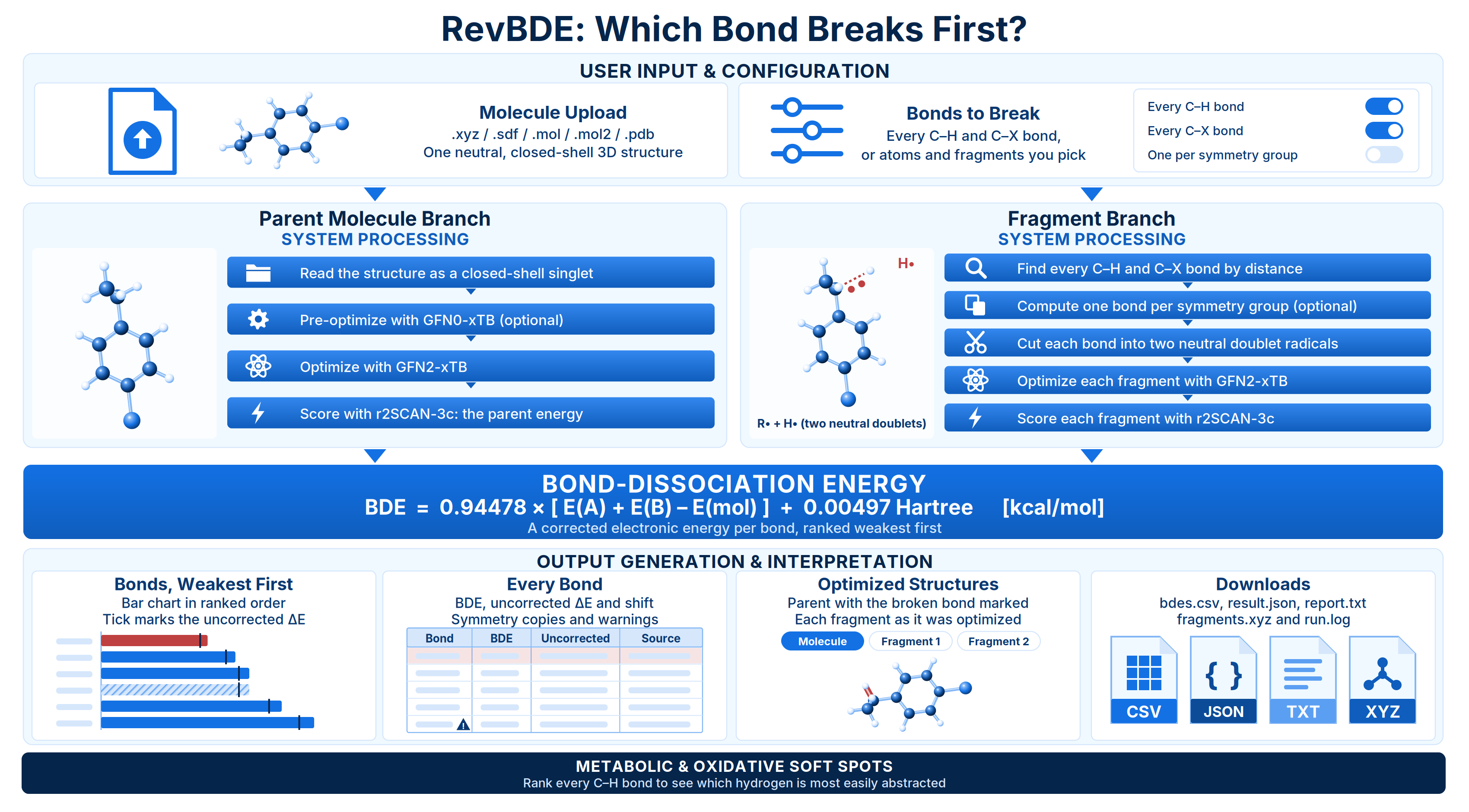
RevBDE calculates bond-dissociation energies (BDEs): the energy needed to break a bond homolytically, so that each half keeps one electron and leaves as a radical. You upload one 3D structure, choose which bonds to break, and RevBDE returns one energy per bond, ranked weakest first. The weakest bond in a molecule is usually the one that decides its fate: it is the hydrogen a radical abstracts first, the site an oxidase attacks, or the bond that breaks under light. Typical uses:- Find metabolic and oxidative soft spots. Rank every C–H bond to see which hydrogen is most easily abstracted.
- Assess halogen stability. Compare C–F, C–Cl, C–Br and C–I bond strengths across a series.
- Probe a specific bond. Break a bond you choose, such as the link to a methyl group or a larger substituent.
- Compare analogs. See how a substitution strengthens or weakens a labile bond.
Background
The BDE of a bond R–X is the energy change when it breaks homolytically into two radicals: In the textbook definition, is the enthalpy at 298 K. RevBDE follows the same scheme with electronic energies:- It optimizes the parent molecule as a closed-shell singlet (charge 0, multiplicity 1).
- For each bond, it cuts the molecule into the two fragments. Each fragment is a neutral doublet (multiplicity 2), and both start from the parent’s optimized geometry.
- It optimizes each fragment independently and computes its energy.
- It takes the raw electronic dissociation energy:
r2scan_3c//gfn2_xtb. With GFN0-xTB pre-optimization turned on, a GFN0-xTB optimization runs first, and the level of theory becomes r2scan_3c//gfn2_xtb//gfn0_xtb.
No vibrational frequencies are calculated, so has no zero-point or thermal terms. Instead, RevBDE applies a fixed linear correction:
The intercept is about 3.12 kcal/mol. The correction lowers BDEs in the range where most real bonds fall, by about 2.4 kcal/mol at 100 kcal/mol and 3.5 kcal/mol at 120 kcal/mol. It stands in for the missing zero-point and thermal terms and for the method’s systematic error, all at once. It is the same for every molecule, so two bonds with the same always get the same BDE.
The reported BDE is a corrected electronic energy, not an enthalpy. RevBDE reports the uncorrected and the size of the correction next to every value, so you can see exactly how much the correction contributes.
Validation
RevBDE was checked end to end against published reference BDEs for fluoroethane and fluorobenzene calculated with the same r2SCAN-3c//GFN2-xTB recipe. Only the input geometry was taken from the reference; every optimization and energy was computed independently.
For fluoroethane (kcal/mol):
Both results are well within the intrinsic error of r2SCAN-3c. The remaining differences come from small differences in the xTB version used for the optimizations.
Running the Engine
Open Quantum Chemistry > RevQuant > RevBDE. The page has two tabs: Bonds to set up a run and Analysis to view results.1
Name the run
Enter a Name (optional, up to 200 characters). A run without a name is called
RevBDE followed by the molecule’s formula.2
Add your molecule
Drop a file on Molecule, or click to browse. You can also drag a file from the Data Engineering panel. Accepted formats are
.xyz, .sdf, .mol, .mol2 and .pdb, up to 10 MB. Once the file is read, the atom count and formula appear, and a 3D view of the structure opens. See Preparing the input file.3
Choose the bonds to break
Under Bonds to break, keep Every C–H bond and Every C–X bond (X a halogen) checked, or clear them and pick bonds yourself. Click atoms on the structure, or on the atom buttons, to break the single bond that holds each one. To pull off a group of atoms together, type their numbers in Fragments, for example
2-3, 7, 8, and click Add. See Choosing bonds.4
Check the plan
The form lists the bonds it will break, such as
C2-H7, with the number of geometry optimizations the run needs and an estimated run time. A bond marked with a warning icon is not a clean single-bond dissociation. Atoms that will be pulled off are highlighted on the structure.5
Adjust advanced settings (optional)
Open Advanced to turn on Compute one bond per symmetry group or GFN0-xTB pre-optimization.
6
Set a runtime limit (optional)
Enter a Runtime Limit (Credits) to cap what the run can spend. Leave it blank for no cap.
7
Run the calculation
Click Run BDE, then Confirm. A notification shows the number of bonds and the estimated time, and the page switches to the Analysis tab with your run selected.
Inputs
You must select at least one of Every C–H bond, Every C–X bond, an atom or a fragment. The selections are combined, and a bond chosen more than once is calculated once.
Preparing the input file
RevBDE reads bonds from the 3D coordinates, so the geometry decides which bonds exist and which ones Every C–H bond finds. SMILES is not accepted.- One molecule per file. A file with several structures is refused. Submit one run per molecule.
- 3D coordinates. An SDF or MOL file flagged as a 2D drawing is refused.
- Neutral and closed-shell. There is no charge or multiplicity to set. A file that declares a formal charge is refused, and so is a molecule with an odd number of electrons. If you see that error, check for a missing hydrogen.
- Elements from H to Rn.
- Include explicit hydrogens. A C–H bond is only found if the hydrogen is in the file.
Choosing bonds
Every C–H bond and Every C–X bond use fixed distance cutoffs (1.2 Å for C–H), so a badly stretched bond in a rough geometry can be missed. The form shows how many bonds each option finds. To break a bond yourself, click the atom that leaves. For example, clicking a hydrogen breaks the C–H bond that holds it. To break a bond between two larger groups, such as the bond to a methyl group, enter every atom of the smaller side as a fragment (the carbon and its three hydrogens). RevBDE checks every split before it runs. A clean split severs exactly one bond and leaves an odd number of electrons on each side. If a fragment is attached by more than one bond, such as a piece cut out of a ring, or by none, the form warns you. The split still runs, but its result is labelled questionable. Splits like these can also fail to produce an energy at all.Symmetry deduplication
Molecules often contain several bonds that are chemically identical, such as the three C–H bonds of a methyl group or the two ortho C–H bonds of a monosubstituted benzene. Compute one bond per symmetry group calculates one bond from each group and copies its value to the rest. On molecules with a methyl group or a symmetric ring, this typically saves a third to a half of the work. When your selection includes equivalent bonds, the form tells you how many bonds deduplication would calculate. Deduplication is off by default. Equivalent bonds can still differ slightly in a calculation, because the optimized geometry is frozen in one conformer. In the fluoroethane validation, for example, the three methyl C–H bonds differed by up to 0.08 kcal/mol. With deduplication on, that spread is not measured, and only one number comes back. Copied values are always marked in the results.Run time and credits
A run with calculated bonds performs optimization ladders: one for the molecule and one for each half of every bond. Bonds are calculated one after another. The r2SCAN-3c single point accounts for more than 99% of each ladder’s time, so the run time depends mainly on the size of the molecule and the number of bonds. Measured times for one ladder:
Every fragment is optimized from scratch, so the whole molecule is recalculated for every bond. Expect a run on a drug-sized molecule with many C–H bonds to take much longer than a small one. Each run also spends about a minute starting up in the queue.
The form shows an estimate before you submit. Above 32 atoms, the estimate is extrapolated and likely to be low, and the form says so. If the estimate is longer than a run is allowed to take, the form warns you that only some bonds will finish and the run will come back partial, and suggests turning on deduplication or asking for fewer bonds. A molecule too large to finish even one bond is refused.
RevBDE bills 1 credit per minute of runtime while the calculation runs. You need enough credits to start a run. If you set a Runtime Limit (Credits), the run stops when it reaches that limit, with the status
terminated_budget_exceeded.
Viewing Results
Open the Analysis tab and click a run in the list. Runs that are in progress showqueued, starting or running with a percentage, and refresh every 10 seconds. The first run in a while can wait in the queue for about a minute while the compute environment starts. Click Change Pipeline to go back to the list.
Run statuses
A
processed run also has a result status, shown as a badge in the list and in the results header:
A questionable, partial or failed result shows a banner above the numbers that explains the problem and what to change. For a questionable split, the fix is usually in the requested fragments or the atom numbering, not in the settings.
Results for a run
The results header shows the result status, the molecule’s formula, the level of theory and the number of bonds, including how many were copied by symmetry. Weakest bond. The label and BDE of the weakest bond, in kcal/mol and kJ/mol. Bonds, weakest first. A bar chart of every bond’s BDE in kcal/mol, in ranked order. A thin tick on each bar marks the uncorrected , so the gap between the tick and the end of the bar is the correction. Bonds copied from a symmetry-equivalent bond are drawn hatched. Click a bar to select that bond. Every bond. A table with one row per bond. Bonds are labelled by their element and file position, such asC2-H7. A split that is not a single bond is labelled by its fragment’s atoms, such as (1,4,5), and marked with a warning icon.
Select a row to see any issue or failure reported for that bond.
Optimized structures. A 3D view of the selected bond. Molecule shows the optimized parent with the two atoms of the broken bond highlighted. The Fragment buttons show each half as it was optimized. Check these views when a BDE looks wrong: a radical that rearranged during its optimization can explain an unexpected value. A copied bond shows the fragments of the bond it was copied from.
Downloads
Click Download in the results header to open every available file:-
bdes.csv: one row per bond, weakest first. Bonds with no energy come last. Columns: -
result.json: the full result, including the level of theory, the correction constants, the parent’s energy and, for each bond, the fragment energies in Eh, the diagnosis of the split and any failure message. -
report.txt: a plain-text summary with the correction, a ranked table of BDEs, the weakest bond and any warnings. -
fragments.xyz: the optimized parent, followed by both halves of every calculated bond. Each frame’s comment line names the bond, the fragment’s atoms, its energy in Eh and its multiplicity. A run in which every bond failed has no geometry file. -
run.log: the raw output of the calculation programs. Check it when a bond fails.
Limits
- One molecule per run, up to 400 atoms and 10 MB. Larger molecules may be refused because not even one bond would finish in time.
- Up to 200 atoms and 200 fragments per run.
- Neutral, closed-shell molecules only, with elements from H to Rn. No charged species or radicals.
- 3D structures only. SMILES and 2D drawings are not accepted.
- Homolytic cleavage only. Heterolytic dissociation (into ions) is not available.
- Gas phase only; solvation is not included.
- One level of theory, r2SCAN-3c//GFN2-xTB. No frequencies are calculated, so BDEs are corrected electronic energies, not enthalpies.
- Every C–H bond and Every C–X bond find bonds by fixed distance cutoffs, and fragments start from the parent’s single optimized conformer. BDEs can shift slightly with conformation.